

How to manage and track remote team productivity
Remote work is now a permanent fixture for many teams. This guide covers the tools, metrics, and dashboards leaders need to keep remote teams accountable and performance visible, including the top 5 WFH metrics for sales, marketing, support, and HR teams.

Remote work is now a permanent fixture for many teams. The positives and negatives of remote work are still debated, but one thing is clear: companies embracing remote work need a real strategy for keeping teams accountable and performance visible.
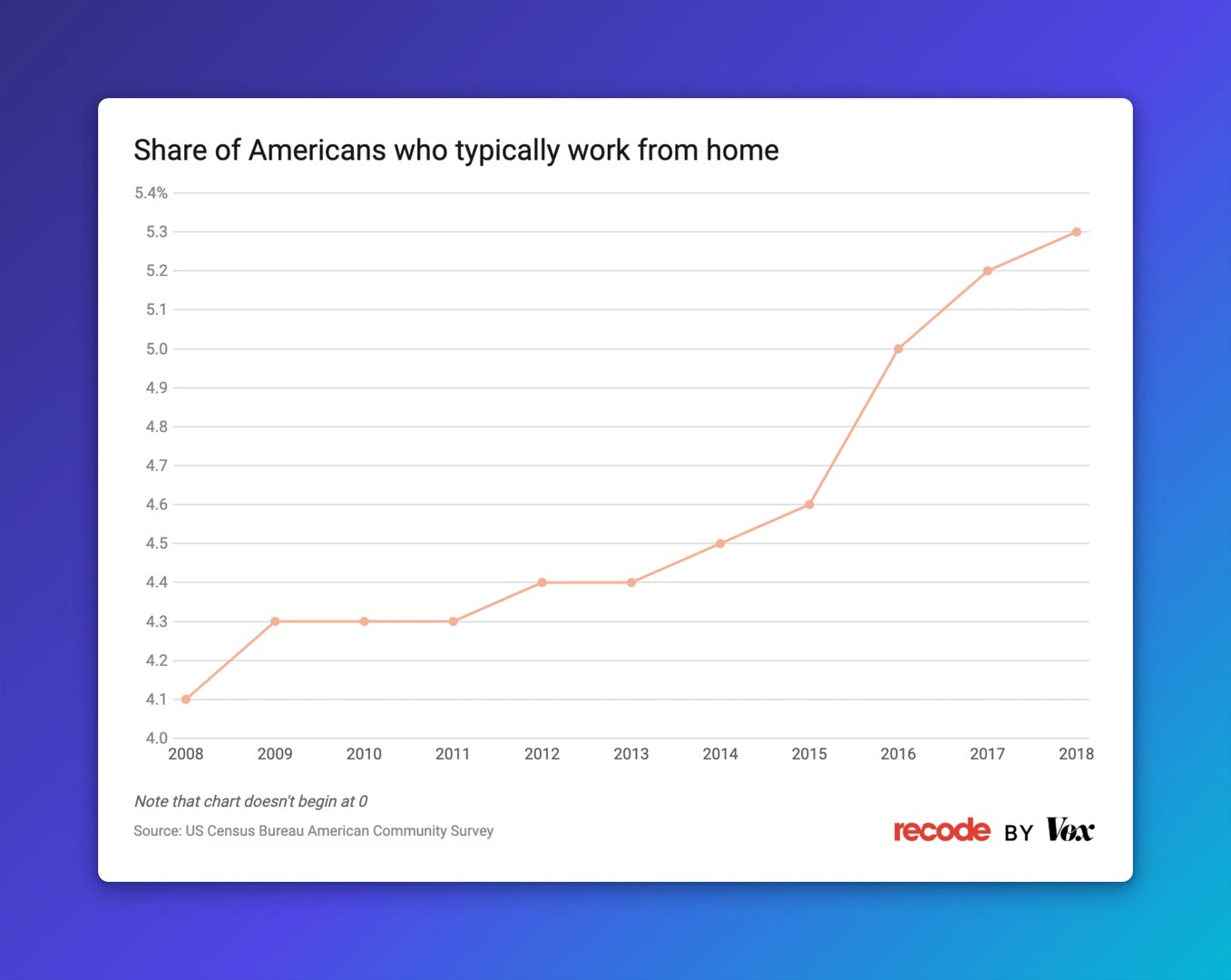
Research suggests that working from home can make you happier. But happiness without accountability isn't a business strategy. The best remote teams combine strong communication habits with a clear view of the numbers. They keep their eyes on the numbers and know, without having to dig, whether they're on track.
Implementing an effective remote work strategy
When a company decides to support remote teams, the right tools make communication, collaboration, and transparency easy. Without them, you're left waiting for someone to pull a number or piecing together updates from scattered inboxes and chat threads.
Tools for managing remote teams
Here are some of the tools Klipfolio uses to keep remote teams aligned:
- Slack for team collaboration and instant messaging.
- Zoom for video calls with team members and customers.
- Google Suite for email, document collaboration, file storage, and shared calendars.
- Mural for visual brainstorming and workflow collaboration.
- Trello for project planning.
ProofHub is another tool worth considering for project and team management.
Daily scrums and regular one-on-one meetings keep teammates informed and supported. Using a video conference tool for these check-ins also helps maintain the personal connections that remote work can erode.
Klipfolio's marketing team, for example, meets every morning at 9:45 AM to align on daily priorities, flag blockers, and share company news. Every team member holds each other accountable and ties activities directly to revenue outcomes.
Metrics to measure remote team productivity
Before looking at how to track performance, it's worth being clear on what to track. The right metrics tell you whether the team is moving in the right direction. The wrong ones just add noise.
Keep it focused. Aim for no more than 10 metrics per team, and avoid metric overload. More metrics don't mean more clarity.
Here are the top 5 WFH performance metrics for sales, marketing, support, and HR teams.
Top 5 WFH sales performance metrics
- Call Volume
- Sales Per Rep
- Revenue Per Sales Rep
- Lead to Win Conversion Rate
- Average Selling Price
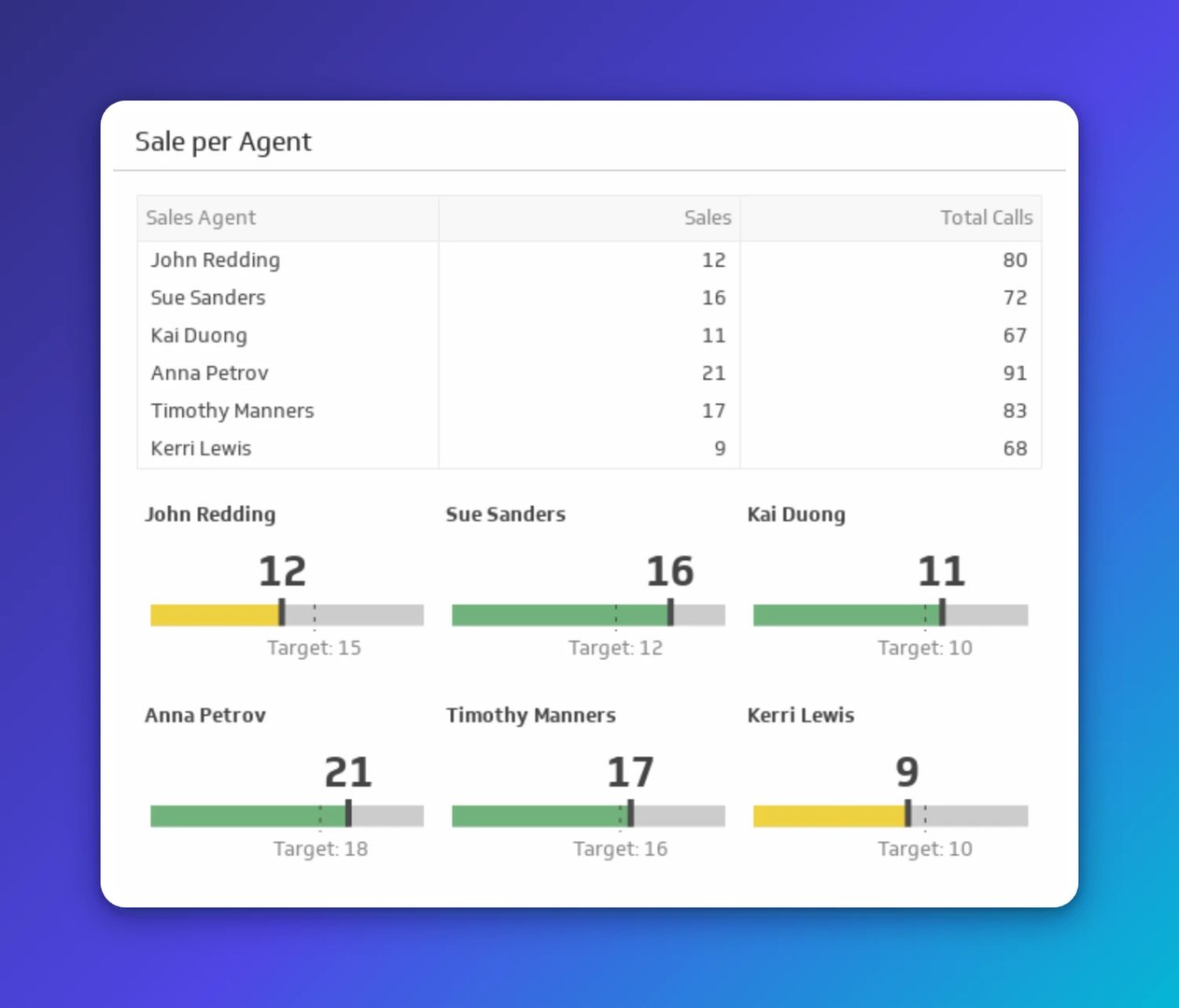
Explore more key sales metrics.
Top 5 WFH marketing performance metrics
- Website Sessions
- New Marketing Qualified Leads
- Lead Conversion Rate
- Customer Acquisition Cost (CAC)
- Return On Marketing Investment (ROMI)
Explore more key marketing metrics.
Top 5 WFH support performance metrics
- Call Volume
- Average Speed to Answer
- First Response Time
- Customer Issues
- Customer Service Satisfaction
Explore more key support metrics.
Top 5 WFH HR performance metrics
- Profit Per Employee
- Revenue Per Employee
- Expenses Per Employee
- Payroll To Revenue Ratio
- Employee Turnover Rate
Create custom dashboards for you and your team.
Get started with KlipsUsing dashboards to track remote team productivity
Knowing your metrics is only half the job. The other half is making sure the right people can see them, without having to ask.
A shared, real-time dashboard solves the problem that messy spreadsheets and generic AI copy-paste workflows can't: everyone sees the same numbers, at the same time, without anyone having to pull a report or explain the business from scratch. That consistency builds trust in the data, and confidence in the decisions that follow.
Klips connects to 130+ data sources, refreshes automatically, and distributes to your whole team through TV mode, scheduled PDF emails, or shared links. A small team can operate with the visibility of a much larger one, without anyone spending their day chasing updates.
Most teams appoint one person as the dashboard owner: someone responsible for building, maintaining, and keeping metrics current. That can be a team lead or a dedicated champion. If your team doesn't have the bandwidth, you can work with a certified partner through Klipfolio's partner network to handle the build and ongoing maintenance.
You'll also want visibility that travels with you. Klips works on mobile and supports dashboard reports emailed to anyone in PDF format, so leaders stay informed without logging in.
Start your free 14-day trial and see how quickly your team can go from scattered numbers to a single source of truth.
Updated 2026-09-09
More in COVID-19

Employee retention metrics: The 5 metrics you should be measuring

Top cybersecurity KPIs to track for risk mitigation

5 tips to understand (and organize) your restaurant data

Best free online project management software tools

10 enterprise software applications every business needs

SMB dashboarding in 2026: Trends shaping reporting
Most recent
- AUG 11Beyond simple sign-ups: how True Trials and Activation predict growth
- JUL 7Why business leaders miss important trends in their dashboards
- JUN 19The best chart for the job: Visualizing data for non-technical users
- JUN 95 tips to understand (and organize) your restaurant data
- MAY 26Think in Horizons, Not Seconds
- MAY 2010 cloud BI dashboard tools for growing firms in 2026